What compliance features should brand approval software have?
Short answer: Good brand approval software can prove four things about every approved asset: which version was approved, who approved it, which guidelines it was checked against, and what was found and fixed first. Speed is nice. Proof is what keeps you on-brand. Here are the six features to ask for, with a demo question for each.
Quick note: this is about brand compliance, meaning your logo, colour, type and brand rules. Legal and regulatory review is a separate job.
1. Rule checks before anyone approves
Your approver shouldn't start from a blank asset. The software should check the work against your guidelines first, so the issues are waiting for them.
- Ask: "What does the approver see before they sign off?"
- In Brandful: Upload your guideline PDF and Brandful turns it into rules. You can correct anything the AI got wrong. Every image, document, copy and social post is scored, and each deduction is explained. Need the same line of copy, like a disclaimer, on every ad? Add it as a custom rule and Brandful checks the copy for it.
2. Findings that point at the rule and the spot
"Logo looks off" is an opinion. "Logo clear space too tight, top corner, and here's the rule" is evidence.
- Ask: "Click a finding. Does it show the rule and the part of the asset?"
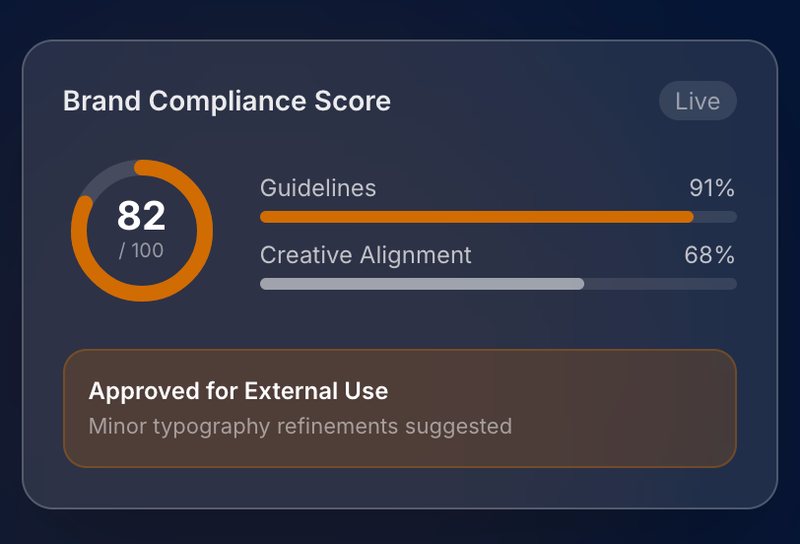
- In Brandful: A violation map pins each finding to the area of the asset and quotes the guideline section. In our fictional APEC Airlines example, Version 1 scores 68/100 with three findings: logo clear space, supporting typography and creative alignment. Same asset, same guidelines, same score, every time.
3. Sign-off tied to one exact version
Every approval should name the version it covers. A common audit failure: Version 2 is approved, Version 3 fixes a typo, and Version 3 ships unreviewed.
- Ask: "Upload a new version after approval. What happens to the sign-off?"
- In Brandful: A new version is treated as a new asset. The old sign-off is cleared and the work goes back for review. Version history keeps every round in one place.
4. Fixes checked, not just claimed
"Fixed" should mean fixed in the file, not in a comment.
- Ask: "Mark something as fixed without changing the file. Does it count?"
- In Brandful: Fix verification checks each claimed fix against the resubmitted file before crediting it. You end up with a versioned record of what was flagged, what got corrected and what still stands.
5. A decision record you can hand over
Each decision should show who decided, when, against which guidelines, and why. That includes the times a rule was knowingly set aside.
Asset and version: APEC Airlines ad, Version 2
Who uploaded it: The agency designer
Guidelines checked against: The guideline version used at review
Findings and fixes: 3 found, 3 verified
Exceptions: Any rule set aside, with the reason
Decision: Approved by the brand manager, timestamped
- Ask: "Show me one asset's full history, from upload to sign-off."
- In Brandful: It all stays on the asset, not in an email chain. Need the record for an audit? Ask us and we'll export it.
6. The right access, and a person with the final say
Limit who can submit, comment and approve, and keep outside vendors to their own work. Then make sure a person signs off, not the software.
- Ask: "Log in as an agency user. Can you approve anything? Can the software approve on its own?"
- In Brandful: Roles cover owners, brand managers, team members and external vendors, and your team can sign in with SSO. Brandful never approves work automatically. Your brand team has the final say.
How to audit an approval trail
Start with the riskiest work, such as paid campaigns and agency work.
- Pick a window, like one quarter or one campaign, and list what went live.
- Match each live file to the version that was approved.
- Check every finding was fixed and verified, or logged as an exception with a reason.
- Check who approved. They should have held the approval role, and they shouldn't have made the asset.
- Look for files uploaded after sign-off that never got a fresh approval.
- Keep each asset's versions, findings and decision together for next time.
Red flags: the approved version isn't the one that shipped; findings left open with no reason; people approving their own work; approvals with no review history.
In Brandful, steps 2 to 5 sit on the asset: who uploaded each version, what was found, who approved it and when.
Do you need a DAM as well?
They do different jobs. A DAM controls who can reach finished files. Brand approval software records how a file got approved in the first place. Brandful is built for that second job: it checks the work and records the sign-off before anything goes live.